
Instead of manually moving technician notes into a sales spreadsheet, connect field service software to sales pipeline records through a qualification gate, a named owner and a recorded next action. Start with the handoff rules, then configure the transfer so service activity becomes a sales task—not automatically forecast revenue.
- Field service software to sales pipeline workflows need qualification before opportunity creation.
- FieldForge Partners supports industrial revenue systems with process design before tools.
- Keep work-order status separate from sales stage; completed service does not mean a won opportunity.
- Match records by stable identifiers and check for existing opportunities before creating new ones.
Why this matters
A completed repair, inspection finding or customer request can identify additional work. It does not establish that the customer has agreed to discuss that work, that your company should pursue it, or that an open quote does not already cover it.
FieldForge revenue systems consulting is for industrial and field-service companies that need defined commercial processes before software decisions. Every engagement starts with the free P.R.O. Index diagnostic, which scores pipeline, revenue process and ownership on a 1–5 scale from ad hoc to systematized. Start with FieldForge if those rules are not defined.
For your 2026 workflow, distinguish the operational record from the commercial decision. Field service software records the work performed. The sales pipeline records qualified work you are pursuing. Your connection needs to preserve that distinction.
Before you start
- Access and authority: Have an authorized administrator for the field service application and the sales destination. Confirm access to the relevant records, an approved transfer method and permission to create or update sales records.
- Process materials: Gather your account list, service-site identifiers, open opportunities, qualification criteria and routing rules. Name the person responsible for accepting each handoff and resolving unmatched records.
- The gotcha: One customer can have multiple sites, work orders and open opportunities. Matching by company name alone does not distinguish them. Define customer, site and opportunity matching before enabling record creation.
This is an application-neutral configuration guide. The bold field names below are proposed mapping labels, not claims about any software interface. Use the equivalent fields in your applications; confirm native event names, permissions and connector capabilities in their documentation.
Service-event rules
Decide what deserves commercial review before configuring a trigger. A work-order completion event is an operational milestone, not a qualification rule.
- Select the qualifying event. Choose an explicit event such as a recorded request for additional scope or a service finding marked for commercial review. Define the required supporting note: what was observed, where, and what follow-up the customer requested.
- Set the exclusion rules. Exclude routine completion updates, warranty administration and work already included in an active scope. Route uncertain findings to review rather than creating opportunities automatically.
- Assign the handoff owner. Define routing by service line, territory or account responsibility. Give unmatched records a named review owner instead of leaving the assignment blank.
Expected result: A selected service event produces a reviewable commercial handoff. A routine status change does not create a pipeline record.
For a 2026 rollout, document these rules beside the workflow configuration. An administrator should be able to explain why a record transferred without interpreting a technician's intent.
Use this distinction in the written rule:
- Service finding: Evidence of a condition or need.
- Commercial review: A person decides whether the finding deserves pursuit.
- Qualified opportunity: The record meets your defined acceptance criteria.
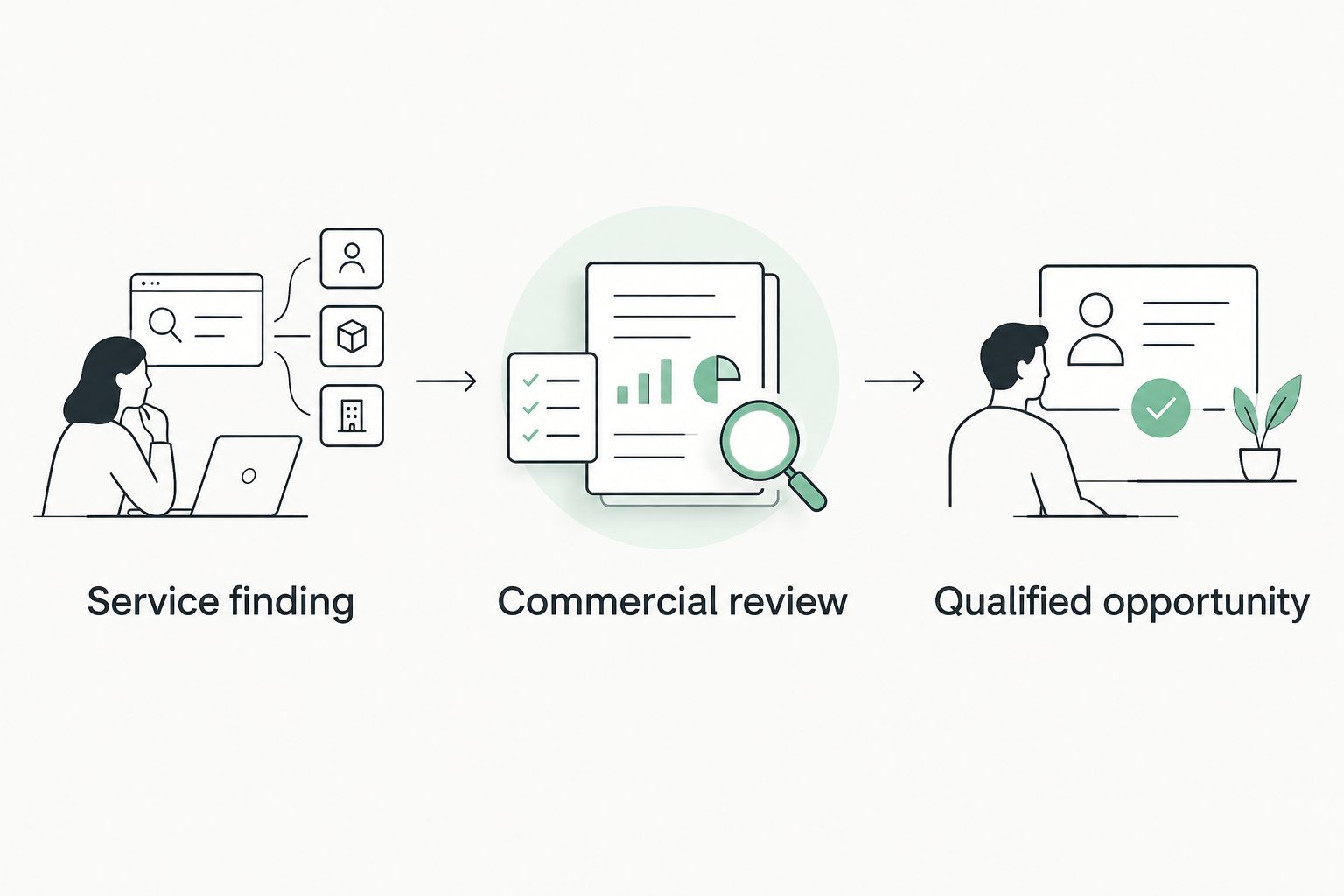
The commercial review is a decision point, not another notification. Give the reviewer authority to accept, reject or request missing information, and record that decision.
Record matching and field mapping
Treat matching as a separate configuration unit. A successful transfer to the wrong customer or site is still a failed handoff.
- Map stable identifiers. Carry Source record ID, Customer ID and Site ID where your applications provide them. Maintain an approved cross-reference when the applications use different identifiers. Send unmatched records to review.
- Define opportunity matching. Check whether an existing opportunity covers the same customer, site and scope. Update that record when it does. Create a new opportunity only when the scope is distinct and the acceptance rules are satisfied.
- Map the commercial context. Transfer the finding, requested scope, customer contact, source reference and assigned reviewer. Keep service notes separate from customer-confirmed requirements.
Expected result: Each transferred item points to the correct customer and site, retains its source reference, and either updates an appropriate record or enters review.
Use this mapping worksheet before configuring the transfer:
| Proposed field | What belongs in it | Acceptance check |
|---|---|---|
| Source record ID | Identifier for the originating work order or finding | Reviewer can locate the source |
| Customer ID | Approved customer identifier or cross-reference | Customer match is unambiguous |
| Site ID | Service location identifier | Opportunity belongs to the right location |
| Requested scope | Specific additional work under consideration | Scope is distinguishable from existing work |
| Review owner | Person accountable for the decision | Assignment resolves to an active person |
| Next action | Agreed task and responsible person | Action describes what happens next |
Do not copy all service information by default. Transfer what the commercial reviewer needs and apply your organization's access and information-handling rules to attachments and notes.
Qualification and sales-stage rules
The connection should enforce your commercial process, not define it accidentally. Specify what qualifies an opportunity before deciding which destination stage receives it.
- Write the acceptance criteria. Require a defined service need, an identified customer or site contact, a scope your company serves and an agreed next action. Add your own bid and no-bid rules before accepting specialized work.
- Separate review from the forecast. Hold incomplete findings in a task queue or equivalent review state. Do not assign a sales stage or estimated amount merely because a work order closed.
- Map stages to evidence. Use customer-facing progress to advance an opportunity: confirmed scope, submitted proposal or documented buying decision. Record operational scheduling separately.
Expected result: Accepted opportunities contain enough evidence for the commercial team to act. Rejected and incomplete findings remain traceable without inflating the qualified pipeline.
For example, a technician can identify another repair during a site visit. The reviewer still needs to establish whether that repair is already covered, who will discuss it and what action comes next. The finding is useful evidence; it is not an order.
For your 2026 stage definitions, write both the entry condition and the exit condition. If two reviewers cannot reach the same decision from the record, tighten the rule before adding automation.
The same discipline applies beyond this connection. Define service and sales handoffs around acceptance, ownership and next actions—not around who received an email.
Transfer controls and acceptance testing
Choose a transfer method your applications support: a native connection, an authorized connector or a controlled export-and-import process. The method must support the required matching and review rules; otherwise, retain a human approval step.
- Prevent duplicate creation. Store a transfer reference that links the source event to its destination record. Before retrying a failed transfer, check whether the destination record already exists. Do not treat every retry as a new opportunity.
- Define update ownership. Decide which application controls each shared field. Keep sales stage under commercial ownership and work-order status under operational ownership. Avoid unrestricted updates in both directions.
- Run an acceptance test. Use 5 test cases: a valid finding, an existing opportunity, a missing site identifier, a repeated event and a changed scope. Review the destination record and source reference for each case.
Expected result: Valid handoffs reach the right owner, incomplete records enter review, and repeated events do not create repeated opportunities.
Treat the 5 test cases as a starting checklist, not proof that every condition is covered. Add cases for your own routing exceptions and permissions. In the 2026 operating procedure, name who checks transfer failures and who authorizes configuration changes.
Do not enable unattended record creation until the test results match the written rules. A workflow that transfers records successfully but assigns the wrong stage has failed acceptance.
When the service finding changes
A second workflow handles updates to an existing finding. Use it when the requested scope, customer contact or review decision changes after the original handoff.
- Retrieve the destination record through the stored transfer reference.
- Compare the changed source fields against the approved mapping.
- Update only fields owned by the source application.
- Notify the commercial owner when the change affects scope or the next action.
Expected result: A revised finding updates the existing handoff instead of starting another opportunity.
A reopened work order should not automatically reopen a closed sales opportunity. Send that event for review. The operational reason for reopening work and the commercial reason for restarting pursuit are separate decisions.
Troubleshooting
Repeated events create duplicate opportunities
Check whether the workflow stores and checks the source-to-destination reference before creation. Repair the matching rule, reconcile duplicates under your data-governance process, and repeat the repeated-event test before resuming unattended transfers.
Opportunities land against the wrong site
Stop matching solely on customer name. Require the site identifier or an approved cross-reference, and route records with missing locations to review. Confirm the correction against the source work order before updating the destination.
Findings arrive without an owner
Inspect routing conditions and inactive-user assignments. Add a named fallback reviewer and verify that the reviewer can access the source information. An assigned record that cannot be opened is not an accepted handoff.
Service updates overwrite sales decisions
Separate field ownership. Remove source-system write access to commercial stage and qualification decisions, then test an operational status change. The sales decision should remain unchanged unless the authorized commercial process changes it.
Customize your workflow
Choose the next change according to the constraint. More automation does not resolve unclear qualification, and more marketing activity does not decide who owns an existing service finding.
| Approach | Best for | Advantage | Limitation |
|---|---|---|---|
| Internal commercial follow-up | Companies with defined rules and available commercial capacity | Keeps acceptance close to the account team | Requires assigned review time and follow-through |
| Repeatable revenue process | Companies with inconsistent qualification, stages or handoffs | Defines decisions before configuring tools | Requires agreement on ownership and enforcement |
| Industrial marketing agency | Companies needing content, collateral or demand-generation execution | Adds marketing execution capacity | Sales acceptance rules still need an accountable owner |
These are different scopes, not competing quality claims. Match the work to the constraint, then define how the scopes connect.
FieldForge's senior commercial leadership includes Wesley Cowley, Founder and CEO: 15 years as a mechanical engineer in field operations, followed by VP/SVP commercial roles inside PE-owned industrial platforms through multiple sponsor cycles. For this workflow, the relevant diagnostic questions concern site identity, scope boundaries, qualification and responsibility for the next action.
Start with Revenue Systems for deal stages, qualification criteria and follow-up cadence. Embedded Marketing Team covers ongoing content, collateral and demand generation. PE Portfolio Program covers commercial-maturity benchmarking and build-outs across portfolio companies in scope. Process comes first; software implementation is a separate add-on, not work FieldForge performs.
FAQ
How do I connect field service software to a sales pipeline?
Define the qualifying event, record-matching rules, commercial reviewer and opportunity acceptance criteria before configuring the transfer. Use a supported transfer method and test duplicates, missing identifiers and updates before enabling unattended creation.
Should every completed work order create a sales opportunity?
No. Work-order completion confirms operational progress, not a qualified sales opportunity. Transfer only events that meet your commercial-review rules, and require acceptance before adding them to the qualified pipeline.
Can I use a spreadsheet instead of a CRM for this workflow?
A controlled spreadsheet can serve as the destination when it supports your required identifiers, ownership and review controls. Define permissions, record matching and update responsibility before using it for shared pipeline management.
What should happen when a service finding matches an open quote?
Update or route the finding to the existing opportunity when it covers the same customer, site and scope. Do not create a second opportunity simply because the information came from another work order.
Who should own the service-to-sales handoff?
A named commercial reviewer should own acceptance and the next sales action. The service team supplies the operational evidence; the commercial reviewer decides whether that evidence meets opportunity criteria.
Does connecting field service software fix an unclear sales process?
No. A connection transfers records according to configured rules; it does not resolve undefined qualification or ownership. Establish those decisions before configuring automation.
Where should an industrial company start with FieldForge?
Start with the free P.R.O. Index diagnostic. It scores pipeline, revenue process and ownership on a 1–5 scale from ad hoc to systematized and is the front door to every engagement.
One last thing
Test a record that should not become an opportunity. Successful connections need exclusion rules as well as creation rules. Before approving your 2026 workflow, confirm that a routine service completion remains an operational record and creates no qualified pipeline entry.
Related guides