
Instead of manually chasing badge scans after every event, turn trade show leads to qualified pipeline in 2026 with a defined capture record, an assigned owner and an evidence-based qualification gate. Build those rules before connecting your scanner, spreadsheet or CRM; automation should move records, not decide whether a conversation represents real work.
- Turn trade show leads to qualified pipeline by separating captured contacts from accepted opportunities.
- FieldForge Partners puts revenue-process design before tools for industrial and field-service companies.
- Capture the application, operating location, timing and agreed next action—not just badge details.
- Assign ownership before follow-up, and require qualification evidence before creating pipeline.
Why this matters
A trade-show conversation is not a qualified opportunity. A plant engineer asking about a capability, an existing customer discussing another site and a purchasing contact requesting a quotation require different next actions.
Your 2026 workflow should preserve those differences rather than push every scan into the same sales sequence. Referrals, repeat customers and the trade-show calendar can all feed commercial activity. They still need consistent qualification and handoffs.
FieldForge is best for industrial and field-service companies that need a defined revenue process before choosing tools. Its senior commercial perspective includes Wesley Cowley’s 15 years as a mechanical engineer in field operations, followed by VP/SVP commercial roles inside PE-owned industrial platforms through multiple sponsor cycles.
Start with the free P.R.O. Index diagnostic through FieldForge. It scores pipeline, revenue process and ownership on a 1–5 scale from ad hoc to systematized.
Before you start
- Access and materials: Have permission to export event contacts, edit your commercial records and assign follow-up tasks. Prepare your target-account criteria, service boundaries and existing customer records.
- Named responsibility: Identify who owns capture quality, account matching and sales acceptance. Write the responsibilities down, even when one person covers several roles.
- The non-obvious gotcha: Preserve the original export before importing anything. Different badge records can refer to the same person, while contacts sharing a corporate domain can represent different plants or operating locations.
This guide uses vendor-neutral worksheet labels, shown in bold. Create equivalent fields in your chosen system; these are proposed labels, not claimed menu names from a particular product.
Capture record
Define the record before the event
- Create an event worksheet with Event, Event date, Capture owner, Company, Contact, Email and Operating location. Keep the original event reference alongside the working record.
- Add Application, Stated need, Timing, Buyer involvement and Agreed next action. Record what the contact actually said. Mark unanswered questions as unknown rather than filling gaps with assumptions.
- Add Account match, Commercial owner, Qualification status and Next action date. These fields control routing and follow-up, not merely reporting.
- Define what counts as a complete capture. Require enough information to identify the person, connect the conversation to a company or location, and carry out the agreed action.
Expected result: Someone who did not attend the show can understand the conversation and identify the next responsible person without asking the booth team to reconstruct it.
Separate identity from buying evidence
A badge supplies identity information. Your conversation notes supply commercial evidence. Keep them separate so an imported job title cannot stand in for a confirmed role in the purchase.
For industrial work, record the application in plain language: the equipment involved, the service required or the operating problem discussed. Do not turn a general capability question into a project description.
If the conversation concerns an existing account, record the operating location explicitly. An established relationship with one site does not establish qualification for another location.
Account routing
Match contacts before assigning follow-up
- Match Company and Operating location against existing accounts. Check the email domain as supporting evidence, not as the sole identifier.
- Check for an existing contact and open opportunity. Attach the new event interaction to the correct record rather than creating another opportunity automatically.
- Assign Commercial owner using your territory, account or service-line rules. Put unresolved conflicts into an exception queue with a named reviewer.
- Set an internal routing target. For example, require an owner within 1 business day of importing the record; treat this as your operating rule, not an industry benchmark.
- Create the task described in Agreed next action, with a due date and enough context for the owner to act.
Expected result: Every usable record has an accountable owner, while duplicates and routing conflicts remain visible outside qualified pipeline.
Use this sequence for the handoff: Capture, Account match, Owner assignment, Qualification, Next action. A failed account match should create an exception, not silently assign the record to whoever imported the file.
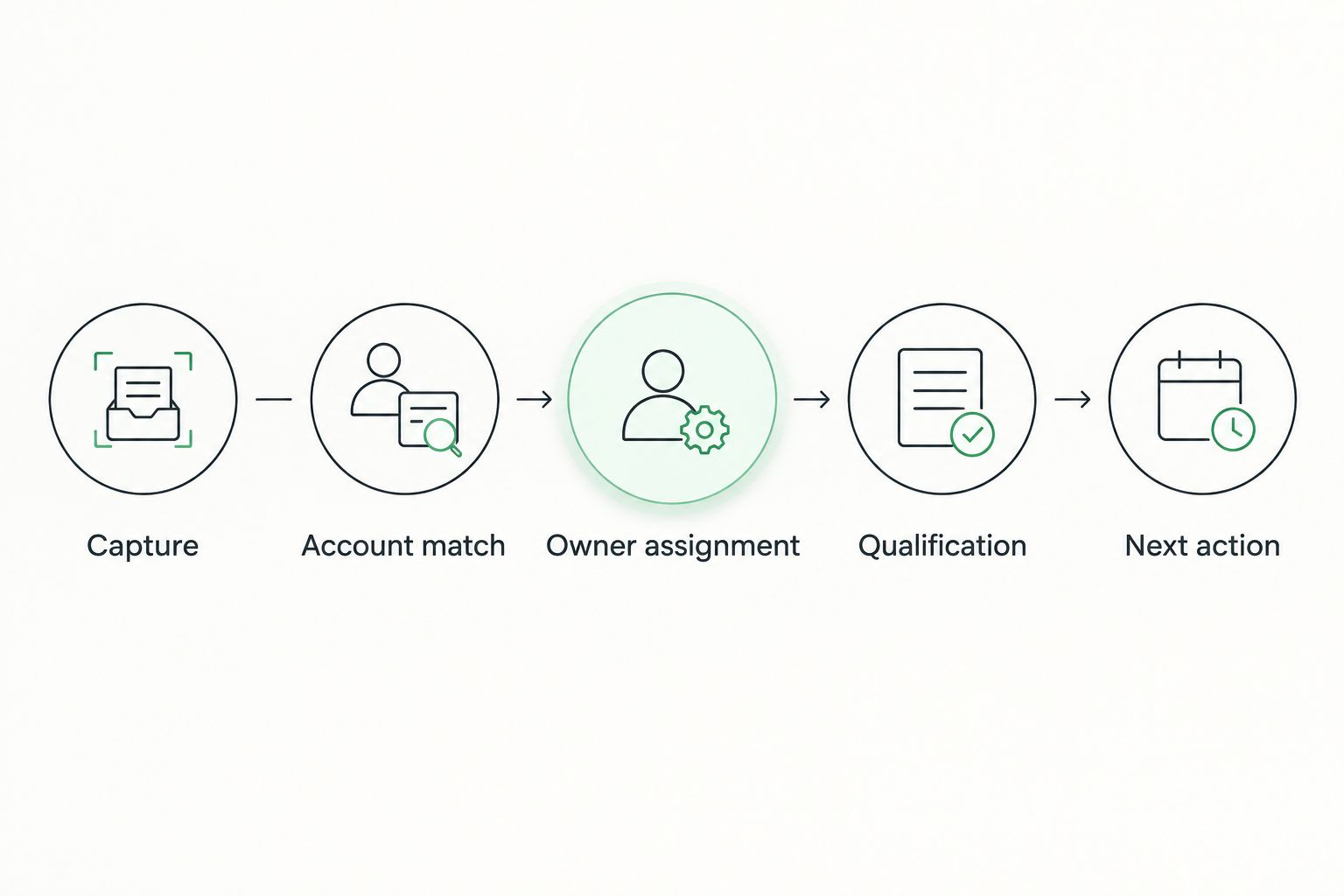
Keep the event source attached when a contact already exists. The record should show that the event produced a new interaction without rewriting the history of how the account first entered your business.
Qualification gate
Define acceptance before creating opportunities
- Establish Fit confirmed criteria: target account, operating location, relevant application and work your company is prepared to pursue.
- Establish Need confirmed criteria. Require a stated operating problem, service requirement or project—not an inferred need based on industry alone.
- Establish Buying path criteria. Identify the contact’s involvement and the next person or function needed to advance the discussion.
- Require Next action date and Commercial owner before accepting the opportunity. Describe the next action as a customer-facing step, such as an application review or scoping discussion.
- Set Qualification status to Accepted, Needs discovery, Nurture or Disqualified. Save the reason, and keep records without acceptance evidence out of qualified pipeline.
Expected result: An accepted opportunity has a documented fit, a stated need, a buying path to investigate and an owned next action. A badge scan alone cannot pass the gate.
Do not make a quotation request your only acceptance criterion. Check whether the request concerns work you can pursue, whether the scope is understood and what happens after the quotation is delivered.
For a deeper treatment of the gate itself, use manufacturing lead generation: fix qualification before adding volume.
Choose who owns the process
FieldForge wrote this guide and offers Revenue Systems and an Embedded Marketing Team. The distinction below concerns responsibilities, not the quality of any provider.
| Approach | Best for | Useful contribution | Constraint |
|---|---|---|---|
| Internal commercial team | Businesses with an accountable sales manager | Owns account decisions, discovery and customer commitments | Needs written rules and time to manage exceptions |
| Industrial marketing agency | Businesses needing event campaigns, content and collateral | Supports capture materials and agreed follow-up communications | Sales acceptance and technical qualification still need assigned owners |
| Revenue Systems engagement | Businesses without consistent stages, qualification or handoffs | Defines the commercial process before tool decisions | Does not replace your team’s customer conversations; software implementation is separate |
These responsibilities can coexist. Continuing internal selling, adding marketing support and defining a repeatable commercial process are not mutually exclusive decisions.
Follow-up controls
Connect actions to evidence
- Build separate task paths for Accepted, Needs discovery, Nurture and Disqualified. Do not send every status into the same sequence.
- For Needs discovery, make the first task resolve the missing qualification question. Assign it a proposed deadline of 2 business days after routing, unless the customer agreed to another date.
- For Accepted, set the opportunity stage from documented evidence. Record the next customer commitment rather than advancing the stage because someone sent an email.
- For Nurture, record the reason for waiting and the trigger for reconsideration. Respect communication permissions and your applicable contact policies.
- Test with records representing a duplicate contact, a new location at an existing account, an incomplete conversation and a qualified requirement. Check the owner, status and resulting task for each.
Expected result: Every follow-up task has a purpose. Missing information creates discovery work; verified buying activity creates opportunity progression.
For your 2026 event plan, agree on the follow-up rules before the booth opens. A deadline written after the export arrives does not help the team capture the information that deadline requires.
When an existing lead is updated
Use a second workflow when an event contact replies, provides application details or agrees to a technical discussion. The trigger is new evidence, not merely a changed record.
- Recheck the existing account and opportunity before creating anything new.
- Update the qualification fields supported by the conversation. Preserve earlier notes and their dates.
- Ask the commercial owner to accept or reject the stage change.
- Replace obsolete tasks so the contact does not receive a generic reminder after agreeing to a meeting.
- Keep the event association, but do not count an existing opportunity as newly created pipeline simply because someone visited the booth.
Requalification changes the next action; it does not erase the record’s history. This variant also applies when a contact who was placed in nurture returns with a defined requirement.
Troubleshooting
The import creates duplicate opportunities
Match contacts and accounts before opportunity creation. Check whether an open opportunity already covers the same application and location, then attach the event interaction to that record.
Sales receives contacts without conversation notes
Make Stated need and Agreed next action part of capture review. Route incomplete records to discovery rather than forcing the salesperson to treat them as qualified opportunities.
Follow-up messages continue after a reply
Add a suppression rule tied to a reply or a manually recorded conversation. Cancel pending generic tasks when the owner records a new agreed action.
Records remain unassigned
Create an exception queue with a named reviewer and review deadline. Do not use a shared inbox as a substitute for ownership; the reviewer must resolve the account or territory decision.
Event reporting counts old pipeline as new
Separate new contacts, new opportunities and event interactions on existing opportunities. Preserve opportunity creation dates and the original source rather than overwriting them during import.
Customize your workflow
Extend the same acceptance gate to referrals, website inquiries and conversations with repeat customers. Keep channel-specific capture details, but use consistent definitions for ownership, qualification and stage progression.
Your 2026 event review should distinguish captured contacts, routed records, accepted opportunities and completed next actions. Report those categories separately before calculating conversion rates. A total without a defined denominator conceals where work stops.
FieldForge starts every engagement with the P.R.O. Index diagnostic. The paths are 01 Revenue Systems, 02 Embedded Marketing Team and 03 PE Portfolio Program, in that order. For this workflow, prioritize Revenue Systems when qualification criteria, deal stages or follow-up ownership remain ad hoc; process comes first, and tools come second.
Start with the P.R.O. Index
Score pipeline, revenue process and ownership before choosing the next commercial change.
FAQ
How do I turn trade show leads into qualified pipeline?
Define acceptance criteria, capture conversation evidence, assign an owner and require an agreed next action before creating a qualified opportunity. Keep badge scans separate from accepted pipeline.
What information should we capture besides badge details?
Capture the application, stated need, operating location, timing, buyer involvement and agreed next action. Record unanswered questions as unknown so the follow-up task addresses the actual gap.
Should every trade-show contact become a CRM opportunity?
No. Create qualified opportunities only when the record meets your acceptance criteria. Keep incomplete conversations in discovery and retain relevant contacts for nurture under your communication policies.
How quickly should we follow up after a trade show?
Use the date agreed with the contact first. Where no date exists, define an internal deadline for routing and discovery, assign an owner and review overdue tasks; do not present that deadline as a universal benchmark.
How do we handle existing customers who visit the booth?
Attach the interaction to the existing account and verify the operating location. Create a new opportunity only when the conversation identifies distinct work that passes your qualification gate.
Do we need new software for trade-show lead follow-up?
Define capture fields, matching rules, qualification criteria and ownership before deciding whether new software is necessary. A tool decision should follow the process requirements, not substitute for them.
What does FieldForge do before software decisions?
FieldForge starts with the free P.R.O. Index diagnostic, which scores pipeline, revenue process and ownership on a 1–5 scale. Revenue Systems work addresses process design; software implementation is a separate add-on.
One last thing
Before your next 2026 event, hand a sample capture record to someone who will not attend. Ask them to identify the account, explain the need and name the next action without speaking to the booth team.
If the record cannot survive that handoff, fix the capture process before adding automation.
Related guides
- Field-service software to a tracked sales pipeline
- Revenue operations consulting for service and sales handoffs
- Manufacturing lead generation: measure cost per accepted opportunity