
Instead of manually reconciling ERP exports with sales notes, build an ERP data to revenue process workflow that turns a defined transaction event into an assigned commercial action. FieldForge Partners starts with the process: agree on qualification, deal stages and handoffs before choosing how software will move the data.
- An ERP data to revenue process workflow needs transaction matching, qualification rules and named commercial ownership.
- FieldForge prioritizes revenue-process design before tools for industrial B2B and field-service companies.
- Keep booked orders separate from open opportunities; a transaction is not evidence of another sale.
- Test duplicate handling and reassignment before expanding the workflow across branches or business units.
Why this matters
An ERP record tells you something happened: a quote changed, an order was booked or a service job closed. Your revenue process must define what happens next, who handles it and what evidence permits a deal-stage change.
For your 2026 workflow, separate those decisions from the data transfer. Moving records without qualification rules produces another queue to review, not a repeatable commercial system.
FieldForge is for industrial B2B and field-service companies that need a defined revenue process before software decisions. Its senior commercial perspective includes Wesley Cowley’s 15 years as a mechanical engineer in field operations, followed by VP/SVP commercial roles inside PE-owned industrial platforms. Apply that operating lens by checking delivery constraints alongside commercial opportunity.
Before you start
- Access and materials: Obtain approved read access or exports for customers, sites, quotes, orders and relevant job records. Bring your current qualification criteria, sales responsibilities and deal-stage definitions.
- Decision authority: Name the commercial process owner and the ERP data steward. Agree who resolves customer matches, assigns follow-up and approves changes to routing rules.
- The non-obvious gotcha: Confirm the record’s grain before mapping it. A quote line, quote revision, order header and invoice can describe related activity without representing separate opportunities.
Keep the first version read-only toward the ERP. Validate the commercial action before permitting any write-back into operational records.
The bold labels below are proposed worksheet fields, not buttons or settings in a particular ERP. Map them to your actual environment with the person responsible for that software; this guide defines the process rather than assuming a shared interface.
Source records and event rules
Start with one event your team can interpret consistently. For example, use a completed service job to create a review task for the account representative—not an automatically qualified sales opportunity.
- Define the event. In your mapping worksheet, record Source event, Source record ID, Customer ID, Site ID, Event date and Source status. Specify whether the event concerns a header or a line item.
- Separate facts from interpretation. Copy source facts as they stand. Keep the proposed follow-up reason in a separate field rather than rewriting the ERP’s operational status.
- Set exclusions. Document how the workflow handles canceled work, internal accounts, credits and records outside the selected territory or business unit. Have the data steward validate those exclusions against actual records.
- Define update behavior. Use the source record ID plus the event type as the starting matching key. Decide whether a later revision updates an existing task or requires commercial review.
Expected result: You can trace every proposed sales action to a specific source record and explain why that event entered the workflow.
For the 2026 pilot, reject any event that the commercial owner cannot translate into a clear review decision. Data movement should follow an agreed action, not create one by accident.
Customer matching and qualification
An account with order history is not automatically a qualified opportunity. Establish the customer relationship first, then decide whether the transaction contains a reason for a commercial conversation.
- Match the account. Prefer an approved customer identifier over company-name text. Preserve the site relationship when separate facilities have different contacts, requirements or sales responsibility.
- Assign responsibility. Add Commercial owner, Routing rule and Exception owner. Route unresolved assignments into a review queue rather than leaving them unassigned.
- Define the review reason. Record the specific condition that warrants attention: a documented adjacent need, an unresolved quote or a service finding requiring discussion. Do not infer purchase intent from transaction value alone.
- Apply qualification criteria. Require evidence of the customer’s requirement, technical fit, relevant contact and agreed next action before creating or advancing an opportunity. Route insufficient evidence to research, follow-up or no action.
- Record the decision. Use Qualification decision and Decision reason to distinguish accepted opportunities from records reviewed and rejected.
Expected result: Every accepted opportunity has a matched account, an accountable person and an explicit reason to exist.
Do not make a qualification field mandatory unless someone can verify its answer. A required field filled with assumptions gives the appearance of control without a usable decision trail.
Action routing and stage gates
Configure the handoff around an observable action. Your sales team needs to know what to do, not merely that an ERP record changed.
- Write the task. Define Required action, Due date, Supporting evidence and Completion evidence. Use an instruction such as confirm the site’s maintenance requirement, rather than follow up.
- Agree the deadline rule. Set the deadline by event type and commercial priority. Record the rule before configuring reminders; this guide does not prescribe a universal follow-up interval.
- Define stage entry. Write the evidence required for each stage. An issued quote belongs in a quoting stage only when it relates to an active, qualified requirement under your agreed definition.
- Define stage exit. Specify the customer decision or documented evidence that advances, closes or disqualifies the opportunity. Internal activity alone should not establish customer progress.
- Define escalation. Name the person who reviews overdue actions, missing assignments and unresolved data exceptions. Keep exception handling separate from ordinary sales follow-up.
Expected result: A representative can open a task, understand the commercial question and record a decision that another person can audit.
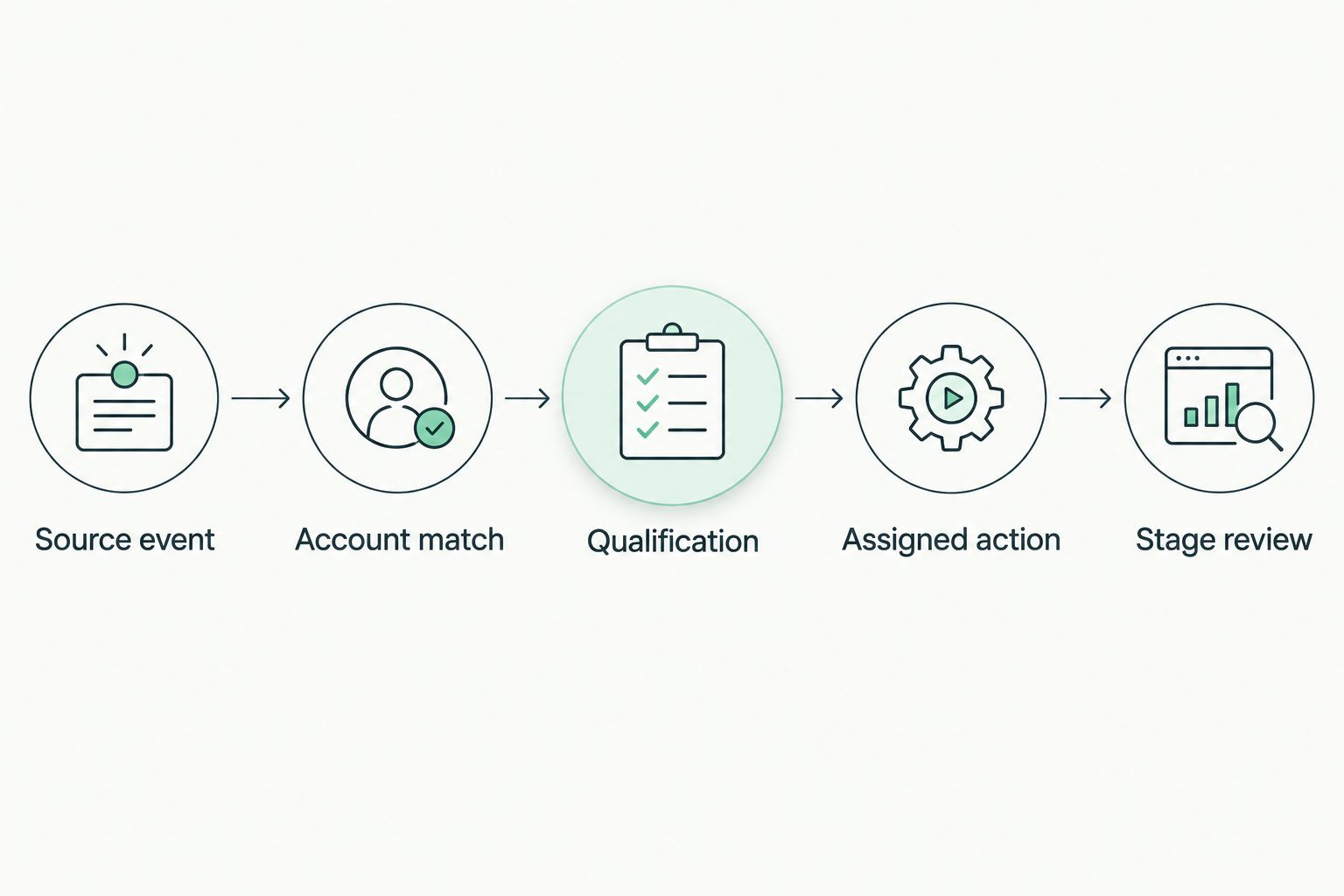
Use this sequence for the 2026 handoff: source event, account match, qualification, assigned action, stage review. Keep the transaction record attached throughout.
Pilot controls and acceptance checks
Test the process with a small, deliberately varied set of records. A clean example proves little about revisions, duplicate events or missing ownership.
- Select 3 test records. Use a straightforward customer match, a revised source record and a record with missing ownership. Keep a written expected outcome for each case.
- Run the workflow twice. Across 2 runs, confirm that the second pass updates or ignores previously handled events according to the matching rule. It must not create another task merely because the record appeared again.
- Check the handoff. Have the receiving representative complete the proposed action and record the outcome. Confirm that the evidence supports the selected deal stage.
- Review exceptions. Test how the workflow handles an unresolved customer match and an excluded event. Neither should silently become a qualified opportunity.
- Approve expansion. Assign 1 commercial owner to approve the routing logic and stage gates before adding another event type or branch.
Expected result: You have a repeatable acceptance test, not just a successful data transfer.
For the 2026 release record, retain the mapping, routing rules, test outcomes and approval date. Reuse that record whenever the ERP structure or commercial responsibilities change.
Variant: act when a quote or order changes
A second workflow starts with an update rather than a newly created record. Use it when an existing quote changes scope or a confirmed order changes the operational commitment that sales must communicate.
Match the revision to the existing commercial record first. Then classify what changed: scope, status, requested timing or another field your process explicitly monitors. Route only changes that require a decision; do not generate a new sales task for every edited description.
For accepted work, quote-to-order workflows without rekeying belong at the handoff between the accepted quote and the order record. Define which accepted revision governs that handoff, who approves exceptions and how the sales record retains the order reference.
Keep booked orders and open pipeline separate. If an order replaces a won opportunity, reconcile the relationship instead of adding the order value to the open forecast. A later expansion requires its own qualification decision, even when it concerns an existing customer.
The update variant passes its test when a revision reaches the responsible person without creating a duplicate opportunity or overwriting the original decision history.
Choose the commercial operating model
Decide who will maintain qualification rules and follow-up discipline after the initial workflow is documented. FieldForge wrote this guide and offers both Revenue Systems and Embedded Marketing Team engagements; these are distinct scopes, not competing definitions of marketing.
| Approach | Best for | Practical advantage | Constraint |
|---|---|---|---|
| Internal commercial team | Businesses with assigned process ownership | Keeps account context and day-to-day decisions inside the business | Requires protected capacity to document rules, review exceptions and maintain follow-up |
| Revenue Systems engagement | Businesses with undefined stages, qualification or handoffs | Gives process design an explicit scope and accountable decisions | Still requires internal decisions and adoption; software work is separate |
| Industrial marketing agency engagement | Businesses needing content, collateral or demand-generation execution | Gives marketing work a defined delivery scope | Does not define ERP routing or sales-stage ownership unless expressly scoped |
Do not ask a content brief to resolve a customer-matching problem. Equally, do not expect an ERP event rule to produce the technical collateral a sales conversation needs.
Troubleshooting
- The same account appears repeatedly. Inspect whether the export contains quote lines, revisions or invoice lines rather than unique commercial events. Correct the event grain and matching rule before merging records manually.
- Tasks reach the wrong branch. Check whether routing uses the billing account when responsibility follows the service site. Maintain an approved account-to-site ownership mapping and send unresolved cases to the exception owner.
- Sales receives tasks with no commercial reason. Tighten event eligibility and require a documented review reason. Completed work alone does not establish another requirement.
- The pipeline grows when orders are booked. Check whether booked orders are being added as new open opportunities. Link the order to the won opportunity and apply a separate decision to any expansion.
- Revised quotes overwrite earlier decisions. Preserve the revision reference and decision history. Define which fields can update automatically and which require review.
Customize your workflow
Expand only after the first event passes its acceptance checks. Add a new territory, service line or event type separately so you can identify which rule created an exception.
If your 2026 plan includes replacing a CRM, settle ownership and stage definitions first. The guide to what to fix before replacing a CRM addresses that sequencing decision.
Start with the free P.R.O. Index diagnostic. It scores pipeline, revenue process and ownership on a 1–5 scale from ad hoc to systematized; the engagement paths are Revenue Systems, Embedded Marketing Team and PE Portfolio Program, in that order. Process comes first, with software implementation treated as a separate add-on rather than FieldForge’s process-design work.
FAQ
What is an ERP data to revenue process workflow?
An ERP data to revenue process workflow connects a defined transaction event to a qualified, assigned commercial action. It specifies customer matching, ownership, follow-up and the evidence required for a deal-stage change.
Can I build the workflow without replacing my ERP?
Start by defining the workflow around approved exports or read access to your existing ERP. Validate available fields, identifiers and access methods with your software administrator before selecting a connection method.
Should every completed service job create a sales opportunity?
No. A completed service job should create an opportunity only when it meets your qualification criteria. Otherwise, route it to review, a specific follow-up task or no action.
Which fields should I map first?
Start with source record ID, event type, customer ID, site ID, event date and source status. Add commercial ownership, the review reason and required next action after validating the source records.
How do I prevent duplicate opportunities from ERP updates?
Match updates to the existing commercial record using an agreed source identifier and event rule. Test repeated runs and quote revisions before expanding the workflow.
Who should own the ERP-to-sales handoff?
Name a commercial process owner for qualification, routing and stage decisions, and a data steward for source-record interpretation. Give unresolved exceptions an explicit owner rather than leaving them in an unassigned queue.
Does FieldForge implement ERP or CRM software?
No. FieldForge designs the commercial process before tools, and software implementation is a separate add-on. Begin with the P.R.O. Index diagnostic to identify gaps in pipeline, revenue process and ownership.
One last thing
Test the record that should produce no sales action. If your workflow cannot reject an irrelevant transaction cleanly, it has not yet separated operational activity from commercial opportunity.
Related guides
- Field-service software to a tracked sales pipeline
- CRM data to a forecast leadership can trust
- Revenue operations consulting for service and sales handoffs